A company depends on an old application. It calculates an important value, exports data or communicates with equipment, but documentation is out of date and the source code is gone. Rewriting everything risks losing a quiet business rule. REA, Reverse Engineer Anything, is interesting here: it connects an AI agent to tools for investigating software. REA · project overview and local-analysis FAQ ↗
Its business value is a potentially shorter route from an opaque application to a testable description of one function. However, “the agent explained the code” and “the replacement behaves correctly” are different outcomes. We examine available capabilities, public examples and a possible local AI station workflow. Sources were checked on 27 October 2026. AI Office inspected documentation and source files but did not install REA or repeat its demonstrations.
Which parts of the news checked out?
REA is an open project with an MCP server and a command-line interface. MCP provides a standard way to connect tools to an AI assistant: the agent requests an analysis operation, receives structured findings and chooses a next step. Official setup lists Claude Code, Codex, Cursor, Gemini CLI and other clients. Installation adds a server and workflow instructions; it does not train the model. REA · project overview and local-analysis FAQ ↗
The popularity is real, but the figures move quickly. At inspection, GitHub’s API reported 390,345 stars rather than the 290,000 in the summary. The repository was created on 14 April 2026. That does not disprove a recent surge, but we did not verify a two-week growth history. Stars measure attention rather than analytical accuracy. GitHub API · REA repository metadata (checked 27 October 2026) ↗
Calling REA merely a bridge to Ghidra is now too narrow. Deep native-code investigation uses an installed analysis engine such as Ghidra, Hopper or IDA. The project also provides static JavaScript/Electron and .NET inspection without a native analysis engine. The required stack depends on the target format and question. REA · project overview and local-analysis FAQ ↗
What the agent receives instead of the original project
A compiled application generally does not preserve the original project in its former form. REA’s Ghidra provider documentation distinguishes instructions and pseudocode from original source. Unresolved calls and incomplete coverage should remain unknown rather than becoming a confident story. REA · Ghidra provider semantics and analysis boundaries ↗
| Target | Useful output | Still needs verification |
|---|---|---|
| Native program | Instructions, pseudocode, calls and references | Algorithm meaning and behaviour on inputs |
| JavaScript / Electron | Modules, imports, IPC and component boundaries | Dynamic routes and a real session |
| .NET assembly | Metadata, CIL and member differences | Runtime behaviour |
| Test process execution | Output, lifetime and selected file changes | Scenario coverage and external effects |
For JavaScript, module relationships, imports and Electron boundaries help explain which part handles the interface and which accesses system functionality. A dynamically computed route may remain unresolved. For .NET, metadata and CIL intermediate instructions are available. The documented static inspection does not execute the assembly or establish its runtime behaviour. REA · JavaScript application workflows and graph limitations ↗ REA · static .NET metadata, CIL and build comparisons ↗
REA retains Evidence: artifact identity, locations, observations, inferences and limitations. In the inspected source, function-analysis results are presented alongside their evidence sources. This supports a useful question: “Which file, address or observation supports that conclusion?” The existence of an evidence record does not make every interpretation correct. REA · CLI, retained Evidence, views and source locations ↗
Three public examples: what was actually checked
The DX-Ball example examines one stereo sound-pan calculation. The original decompiler pseudocode did not express the complete formula. Reconstruction used instructions, the caller and constants read from the program. The published record lists 3,205 comparisons with original x86 execution and a match for all 63 compiled function bytes after reviewed relocations were applied. REA · DX-Ball evidence, 3,205 cases and 63-byte validation scope ↗
Those figures concern one function at a pinned reconstruction checkpoint. The website update reused saved results rather than repeating the entire validation run. For business work, this illustrates a useful acceptance method: compare a recovered formula against the original on controlled inputs. A persuasive explanation alone is insufficient. This is not evidence of automatic whole-game recovery. REA · DX-Ball evidence, 3,205 cases and 63-byte validation scope ↗
The Notion example follows a clipboard path from the page-facing API through preload and inter-process communication to Electron’s main process. Its evidence notes explicitly say that one static graph did not resolve the complete route. Reading wrappers and separately cached modules supplemented the findings; no single live copy session covering all described components was recorded. REA · Notion clipboard evidence and unresolved coverage ↗
This shows why an engineer remains part of the investigation. Finding an inter-process bridge does not establish a complete feature map. The approach could help understand a company’s own desktop application, provided component versions and actually tested actions are recorded.
The third example investigates a bullet-direction helper in the old DOS game TH04. REA relates instructions and addresses to the function analysis. Historical source and compiler checks belong to a separate reconstruction project. The page does not claim that a fresh REA session independently recovered every name and meaning or proved whole-game equivalence. REA · TH04 evidence and separate reconstruction provenance ↗
These are demonstrations published by the project and reconstruction contributors. We do not present them as an independent general benchmark. Their useful feature is the combination of explicit scope, source links and checks that readers can examine.
Where a company could use the approach
One application is transferring a calculation from an old internal application into a new service. An order total might depend on rounding, minimum quantities and the order of discounts. Investigation should produce a specification: inputs, formula, exceptions and permitted differences.
An agent can prepare a hypothesis and a small implementation, while an engineer compares them with an authorised reference run on anonymised examples. Acceptance should cover zero and boundary values, repeated operations, invalid inputs and rounding. Connecting the replacement to a new system comes later. This is a proposed business scenario, not a reported REA or AI Office deployment.
A second application is replacing an old integration component. A company has a utility it is authorised to examine, accepting a file and producing an export for an accounting system. REA could help map the application and its relationships, while observing a test run clarifies the actual format. The goal is a compatible new implementation based on a verified specification.
A 1C connection would be a separate development task: investigate an old export, describe its fields, write a transformation and check it in a test database. This does not mean REA already understands every closed 1C module or can independently post accounting documents. Accounting rules, integration interfaces and acceptance criteria remain separate work.
A third application is investigating changes between two versions of a company’s own application. The .NET documentation describes member comparisons, while JavaScript workflows support application-graph comparisons. These could give a developer a shortlist for a regression investigation. A static difference narrows the search but does not establish the cause of a failure by itself. REA · static .NET metadata, CIL and build comparisons ↗ REA · JavaScript application workflows and graph limitations ↗
| Task | Pilot deliverable | Acceptance criterion |
|---|---|---|
| Transfer a legacy calculation | Specification and separate implementation | Agreement with a reference on approved inputs |
| Replace an export component | Format specification and test transformer | Matching fields, totals, errors and repeats |
| Investigate a version regression | Difference map and testable hypothesis | Reproduced failure and a correction test |
A local tool and a local model are separate decisions
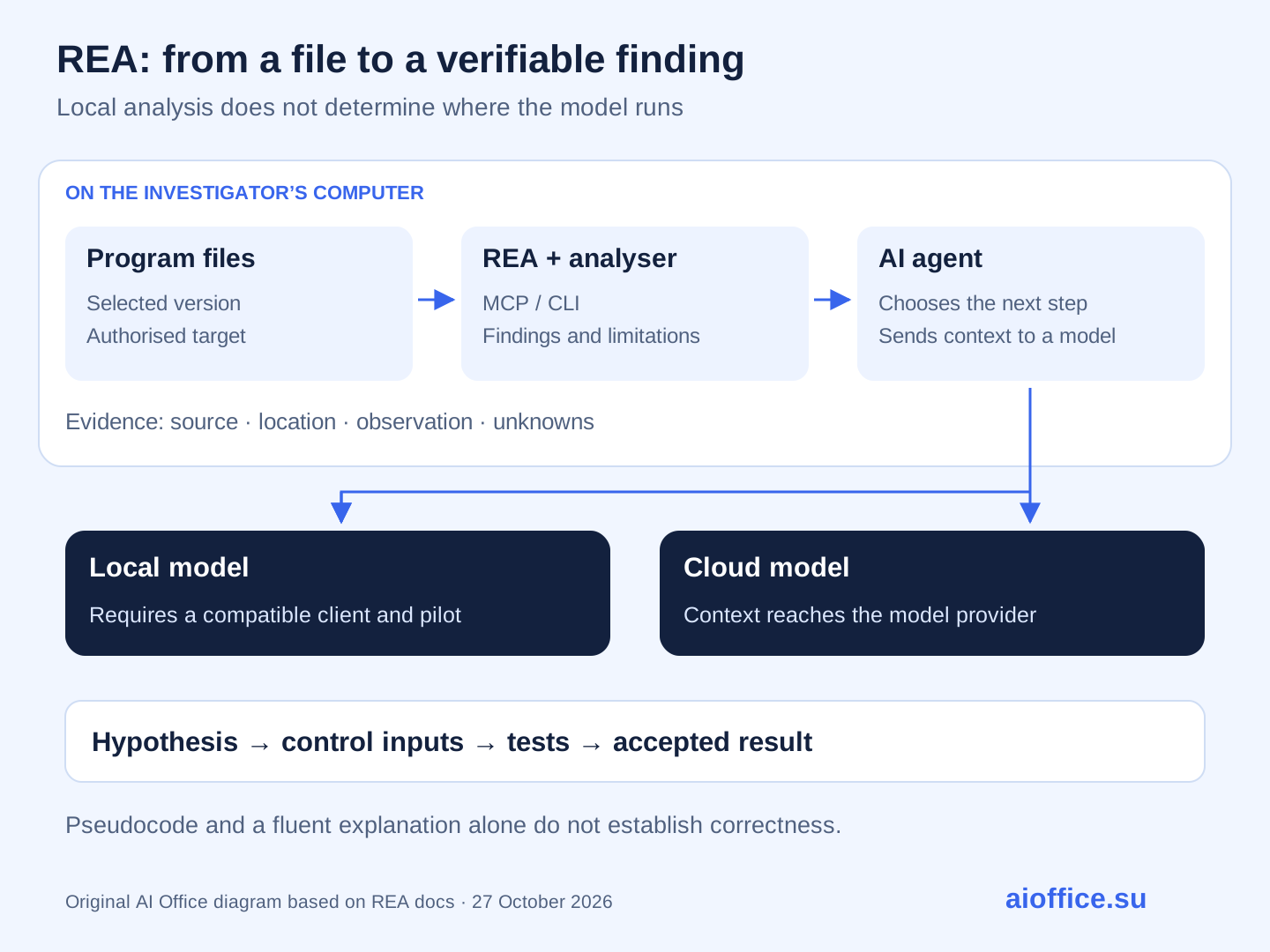
REA analyses files on the user’s machine, but the agent receives its results. If that agent uses a cloud model, portions of pseudocode, strings or reports may reach the model provider. The README explicitly separates REA’s local analysis from the provider’s data policy. “Runs locally” does not describe the whole chain. REA · project overview and local-analysis FAQ ↗
An internal investigation could use a local analyser, an agent and a model hosted on an AI station. MCP support in the selected client, tool-calling reliability, result size and the model’s handling of unknowns all need testing. Public weights or a large context window alone do not establish those qualities.
A 96–128 GB station class is one possible platform to evaluate. The inspected materials do not test AI Office’s configuration with REA, so speed, maximum application size or parity with cloud models cannot be promised. Analysis engines and models have different resource needs; long reports also consume context and review time.
A practical approach is to give the model a bounded area and retain the full report separately. The documentation provides views and selections from completed Evidence, rather than requiring every result to be sent at once. That principle helps local and cloud deployments alike: each next step needs relevant evidence. REA · CLI, retained Evidence, views and source locations ↗
What “free” means and how setup works
REA-authored code uses the MIT licence. That does not include a licence for Hopper, IDA or other commercial tools, nor does it pay for a model. Project costs still include hardware, possible API usage, engineering, testing and maintenance. REA’s licence also does not transfer rights to the inspected application or its material. REA · MIT licence ↗ REA · authorised analysis, output rights and external-tool terms ↗
At inspection, npm published rea-agents 6.8.0. The documented setup command is: REA · published v6.8.0 release, 25 October 2026 ↗
npx rea-agents setup
The wizard lets users select agents, shows configuration changes and requests approval. Documentation describes configuration backups. The agent must then be restarted. Native analysis requires the appropriate engine and dependencies; this command does not automatically install Ghidra or Java. REA · setup, dependencies and release/main distinction ↗
Distinguish the published package from documentation on main. The project moves quickly, and the same version string in a source checkout does not establish byte-for-byte identity with npm. A pilot should record exact REA, engine and model versions and check the actual available tool list. The command is included as reference; it has not been installed on our server. REA · setup, dependencies and release/main distinction ↗
Why a convincing explanation needs verification
The original summary makes a reasonable point: agents can be wrong. The inspected material does not establish a universal accuracy rate for “simple” versus “complex” code. Even the DX-Ball example required more than its initial pseudocode: several observations had to be combined and the reconstruction tested. REA · DX-Ball evidence, 3,205 cases and 63-byte validation scope ↗
Ask an investigation report to distinguish what was directly observed, what was inferred and how the inference was checked. A resolved call does not mean every possible call has been found. A static path does not establish that it executes in the scenario of interest. The Ghidra provider explicitly preserves such limitations. REA · Ghidra provider semantics and analysis boundaries ↗
Reading a file also differs from executing a program. Process Capture runs the selected command with user permissions and an inherited environment; observation paths do not restrict process access. REA’s security policy separately states that its bridges and temporary projects are not a sandbox. Investigation environments and data access need their own design for unfamiliar applications. REA · process capture permissions and host limitations ↗ REA · security boundary: bridges are not a sandbox ↗
For a company pilot, choose owned or explicitly authorised software, remove production secrets from the test environment and separately permit execution, network calls and changes. A limited inspection should not silently turn into work with live customer data. The project itself distinguishes authorised research from copying protected code or bypassing restrictions. REA · authorised analysis, output rights and external-tool terms ↗
How to start with a bounded project
Choose one function that matters: a calculation, an export or a component boundary. Record the application version and checksum, available inputs and expected output. Ask the agent for an evidence map, a hypothesis and unknowns. Check behaviour on a control set before commissioning a separate implementation with tests.
Measure engineering time to an accepted specification, corrected assumptions and agreement on verification cases. Not every legacy application needs reverse engineering: available documentation, source code or an agreed vendor interface may solve the problem faster.
REA offers a way to connect AI with observations about actual software. AI Office can help examine a workflow, select a local model and design a limited pilot, from one authorised target to a verifiable outcome. Start with a function whose loss is currently holding back your system’s development.